PII Masking & Guardrails
Guide to configuring PII detection, data masking, and content safety guardrails for Cosmos apps and agents
Updated 2026-11-03
Verified 2026-11-03
Overview
Guardrails are safety layers that run before and after model calls. They protect your users' personal data and keep conversations safe and on topic.
| Guardrail | What it does |
|---|---|
| PII filter | Detects personal information in user input and tool responses and replaces it with placeholders before the model sees it. |
| Content filter | Uses a model to block harmful or off-topic messages. |
You can set guardrails in three places:
| Where | Scope |
|---|---|
| Responsible AI → Guardrails | Organization defaults for new apps and agents |
| App Guardrails step | Applies to all agents in the app |
| Agent Guardrails step | Applies to one agent |
ℹ️ PII settings on an app apply to every agent in that app. The app's content filter is the default for its agents, and an agent can override it.
Cosmos can also remove personal information from files before they are stored, with Redact before upload in Files & Folders. See Knowledge Base & Document Indexing.
How PII Masking Works
User: "My email is john@example.com and my Aadhaar is 2234 5678 9012"
                          ↓
                    PII detection
                          ↓
Masked: "My email is [EMAIL_ADDRESS_1] and my Aadhaar is [IN_AADHAAR_1]"
                          ↓
                The model receives masked text
                          ↓
Model: "I'll send a confirmation to [EMAIL_ADDRESS_1]"
                          ↓
                      Demasking
                          ↓
User sees: "I'll send a confirmation to john@example.com"
- Reversible — original values are kept in a secure per-session mapping and restored in the reply to the user.
- Tool-aware — when the model calls a tool with a placeholder, Cosmos passes the real value so the tool works. Tool responses that contain PII are masked again before the model sees them.
- Streaming-safe — placeholders are restored correctly in streamed replies.
- Consistent — the same value maps to the same placeholder throughout a session.
Step-by-Step: Set Organization Defaults
- In the sidebar, under Quality & Governance, open Responsible AI. The Guardrails page shows Default Protection for New Apps & Agents.
- Under PII Protection, configure:
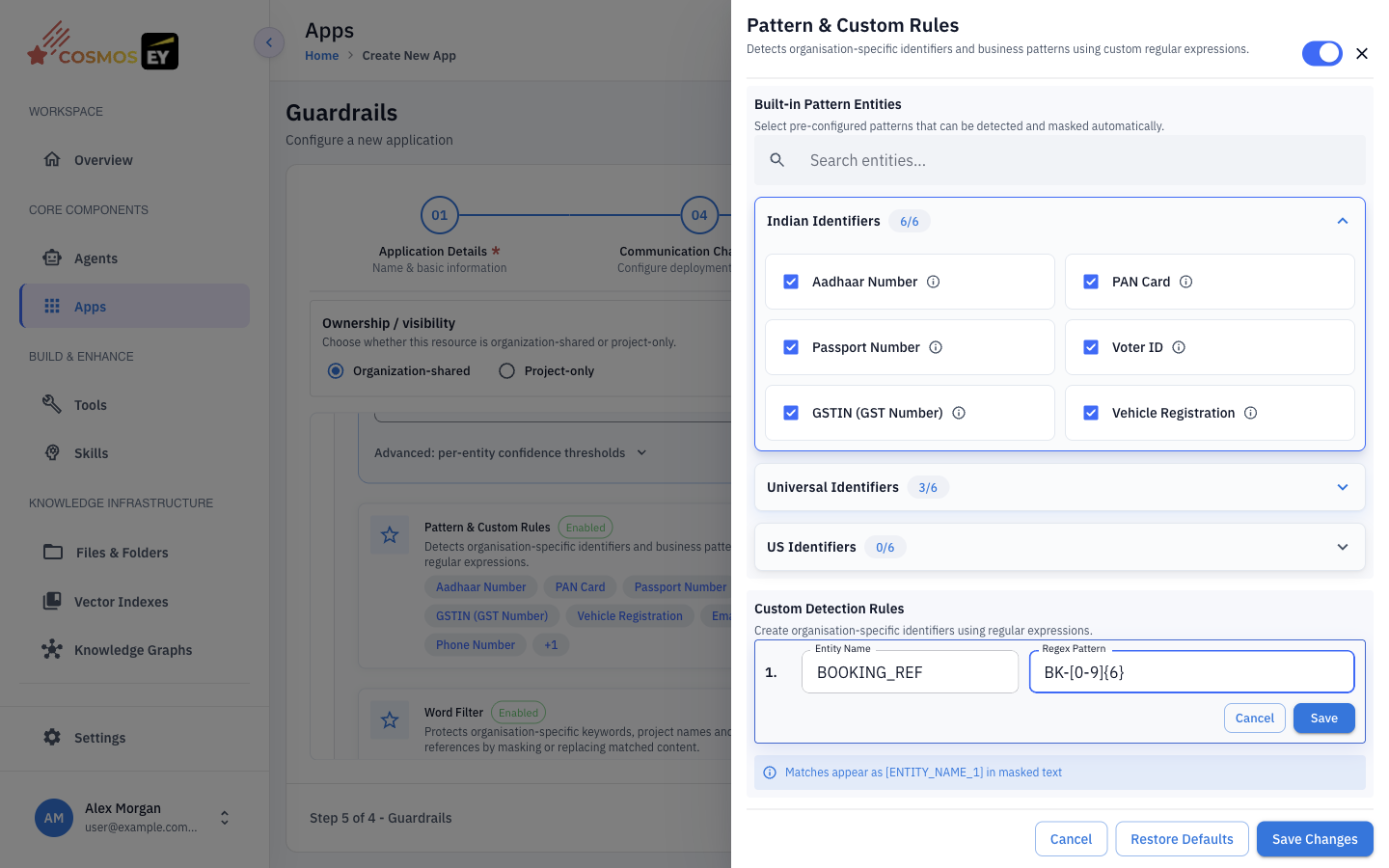
- Pattern & Custom Rules — turn on Built-in Pattern Entities and add Custom Detection Rules (see below).
- Named Entities — detection of names and similar entities, with optional enrichment through Azure AI Language when your organization has it configured.
- Word Filter — groups of words to detect and mask.
- Under Content Safety, choose the LLM Provider and Model, set the Sensitivity Threshold, choose topics, and write the Blocked Response Message.
- Click Save Changes. Click Restore Defaults to return to the platform defaults.
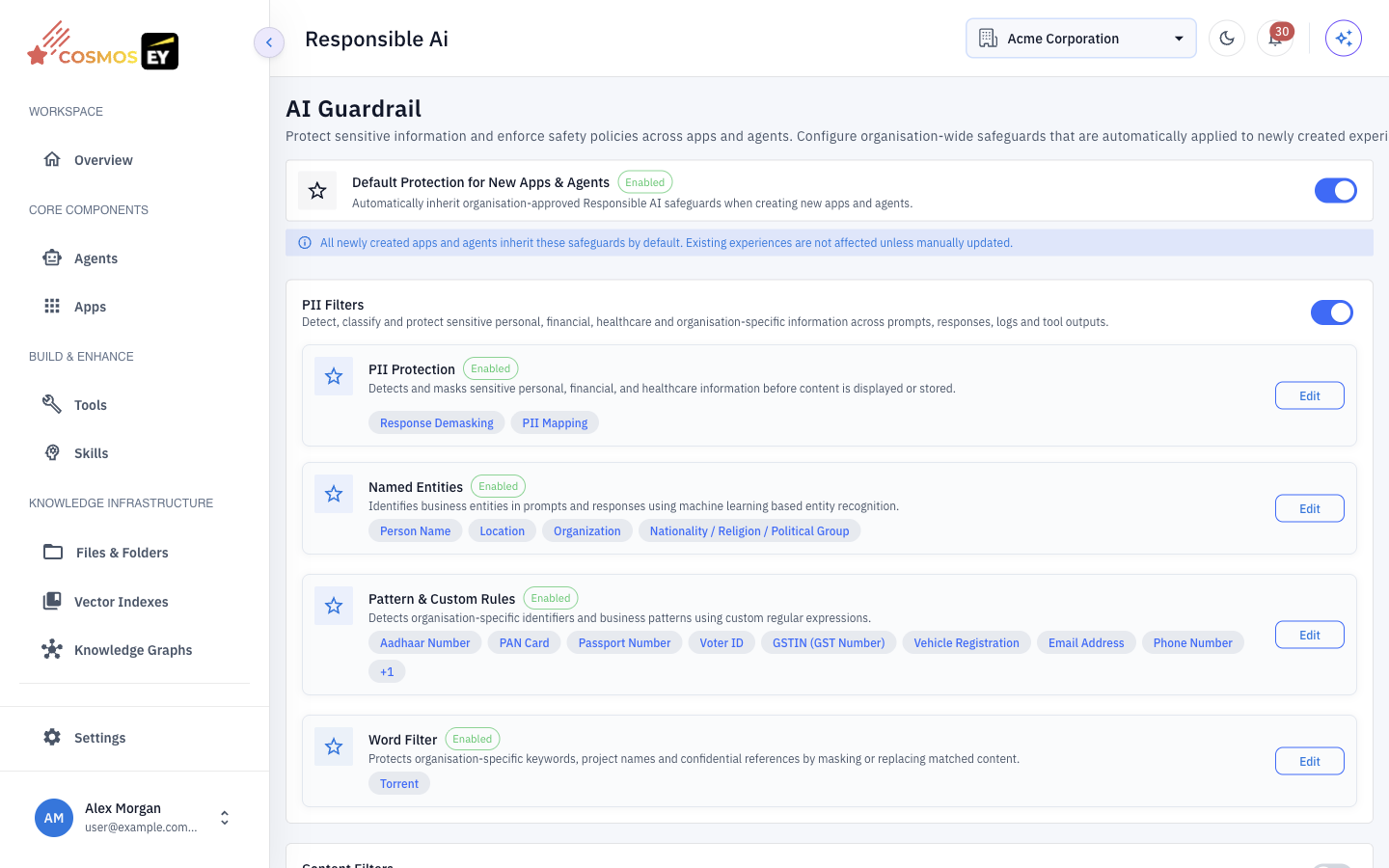
New apps and agents start with these settings.
Step-by-Step: Guardrails on an App or Agent
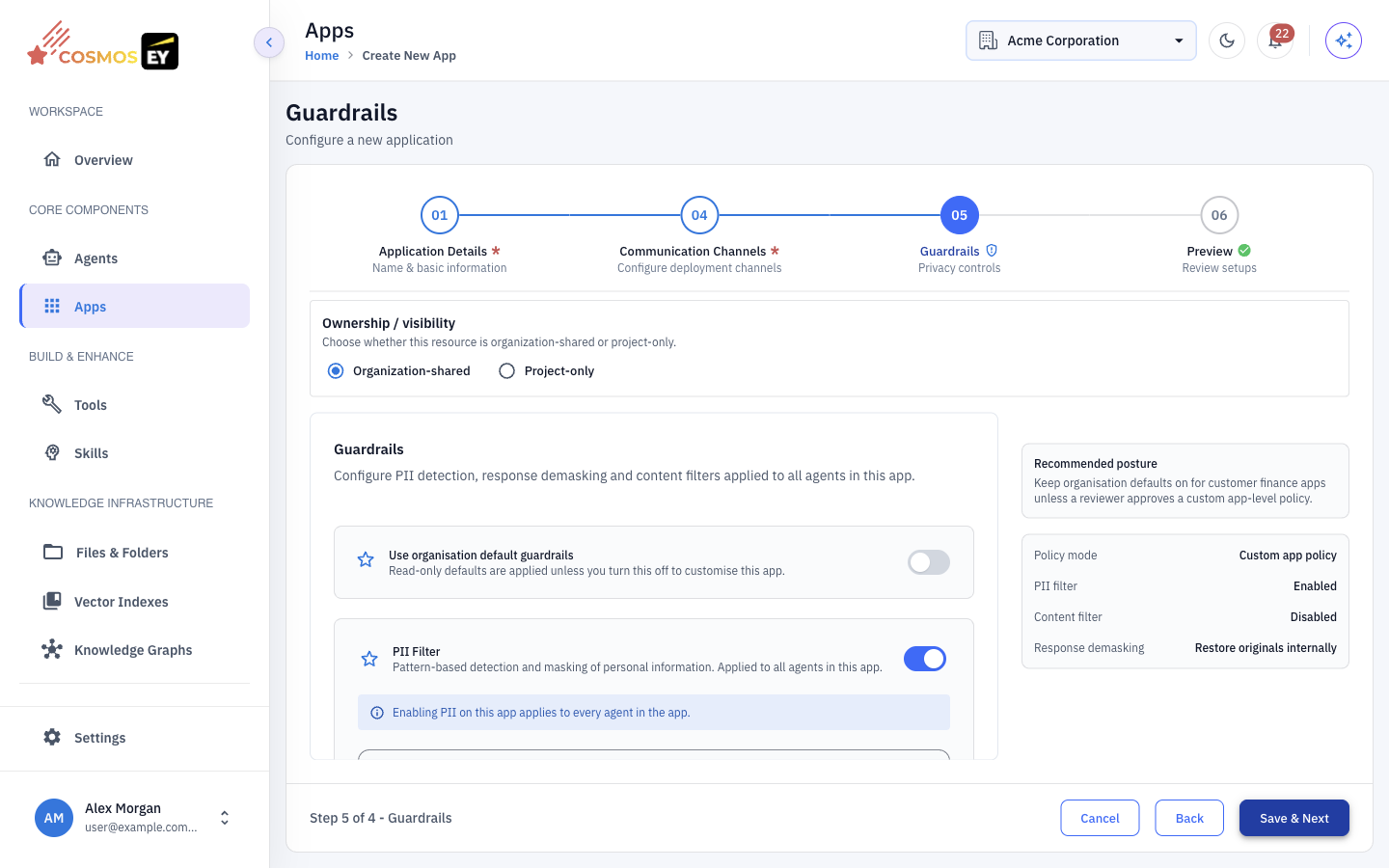
- Open the app or agent with Edit and go to the Guardrails step.
- Choose the Policy mode:
- Organisation defaults — use the organization settings. The Use organisation default guardrails switch controls this.
- Custom app policy or Custom agent policy — set rules for this app or agent only.
- With a custom policy, configure:
- PII filter — the entities to detect and any custom rules.
- Response demasking — Restore originals internally to show users their original values, or Keep masked to keep placeholders in replies.
- Content filter — model, validators, threshold, topics, and Blocked Message.
- Save, then test the app or agent.
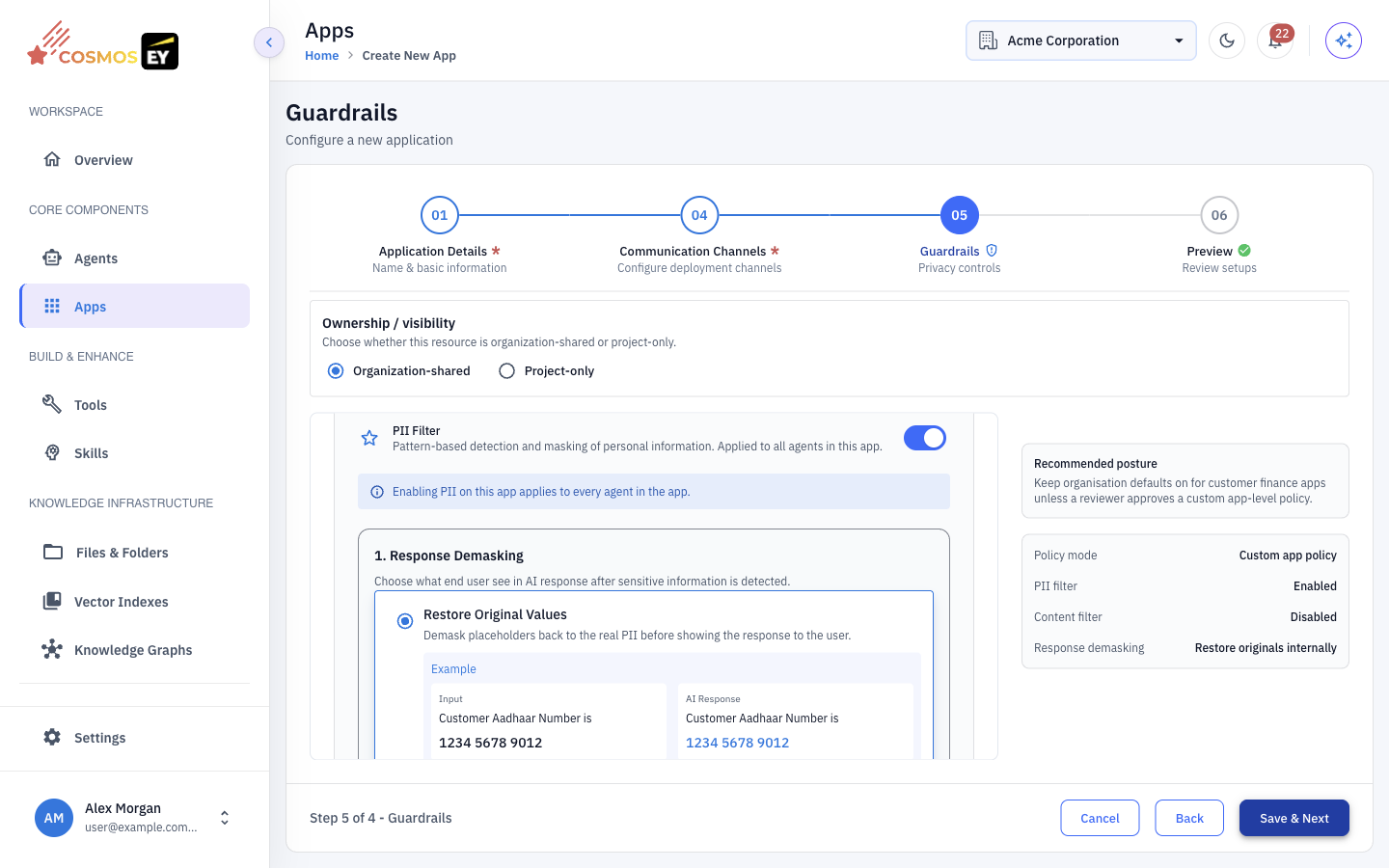
Entity types
Built-in pattern entities include:
| Entity | Example match | Placeholder |
|---|---|---|
EMAIL | john@example.com | [EMAIL_ADDRESS_1] |
PHONE | +1-555-123-4567 | [PHONE_NUMBER_1] |
CREDIT_CARD | 4111 1111 1111 1111 | [CREDIT_CARD_1] |
IP_ADDRESS | 192.168.1.1 | [IP_ADDRESS_1] |
AADHAR | 2234 5678 9012 | [IN_AADHAAR_1] |
PAN | ABCDE1234F | [IN_PAN_1] |
PASSPORT | J1234567 | [IN_PASSPORT_1] |
VOTER | ABC1234567 | [IN_VOTER_1] |
GSTIN | 22AAAAA0000A1Z5 | [IN_GSTIN_1] |
VEHICLE_REGISTRATION | MH02AB1234 | [IN_VEHICLE_REGISTRATION_1] |
CREDIT_CARD and AADHAR are validated with checksums, so random digit strings of the right length are not flagged.
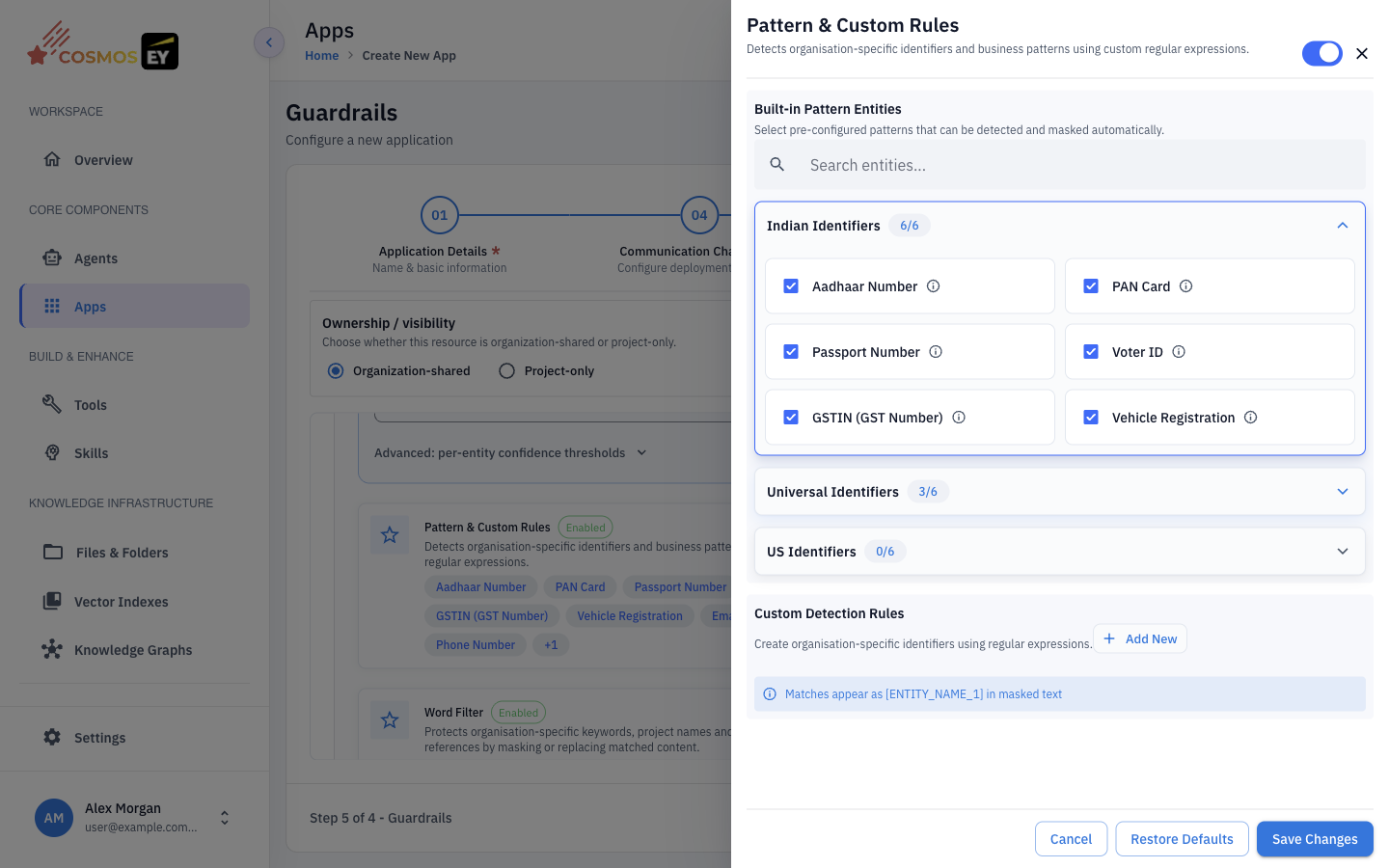
⚠️ Select at least one entity type or add at least one custom rule when the PII filter is on, or the form will not save.
Custom detection rules
For your own identifiers, such as order IDs or account numbers, add a custom rule:
- Enter an Entity Name in uppercase, for example
ORDER_ID. - Enter a Regex Pattern, for example
ORD-\d{8}. - Add the rule.
Matches are masked as [ORDER_ID_1], [ORDER_ID_2], and so on.
Test it
Send a test message that contains PII:
Call me at 555-123-4567 or email john@example.com
With Restore originals internally, the reply shows your original values, while the model only sees [PHONE_NUMBER_1] and [EMAIL_ADDRESS_1]. In Logs, the session shows a PII Detected marker.
Content Filter
The content filter uses a model to check whether a message breaks your rules. Validators come from your environment and typically include:
| Validator | What it detects | Setting |
|---|---|---|
| Toxicity | Hate speech, threats, dehumanizing language | Sensitivity Threshold |
| Profanity | Vulgar or obscene language | Sensitivity Threshold |
| Allowed Topics | Messages outside the topics you allow | List of allowed topics |
| Blocked Topics | Messages about subjects you ban | List of blocked topics |
To add topics, type a topic and press Enter. When a message is blocked, the user sees your Blocked Message instead of a model reply.
Best Practices
- Set organization defaults first so every new app starts protected.
- Start with common entities such as
EMAIL,PHONE, andCREDIT_CARD. - Add regional entities your users need, such as
AADHAR,PAN, andGSTINfor India. - Use custom rules for internal identifiers such as order IDs and employee numbers.
- Test with realistic inputs and check that tool calls still work with the restored values.
- Combine PII masking and content filtering. One protects data; the other protects tone and topic.